Deine Elektroplanung. Komplett in einem Tool.
Installationsplan, Stromlaufplan, Schaltschrankaufbau, Stückliste, KNX-Gruppenadressen und Prüfprotokolle. Planen, dokumentieren und exportieren, ohne das Tool zu wechseln.
Drei Editoren. Eine Plattform.
Die Werkzeuge, mit denen du wirklich arbeitest
Installationsplan, Stromlaufplan und Aufbauplan: drei spezialisierte Editoren, nahtlos verbunden. Stückliste, Prüfprotokolle und Export bauen auf denselben Daten auf.
Installationsplan
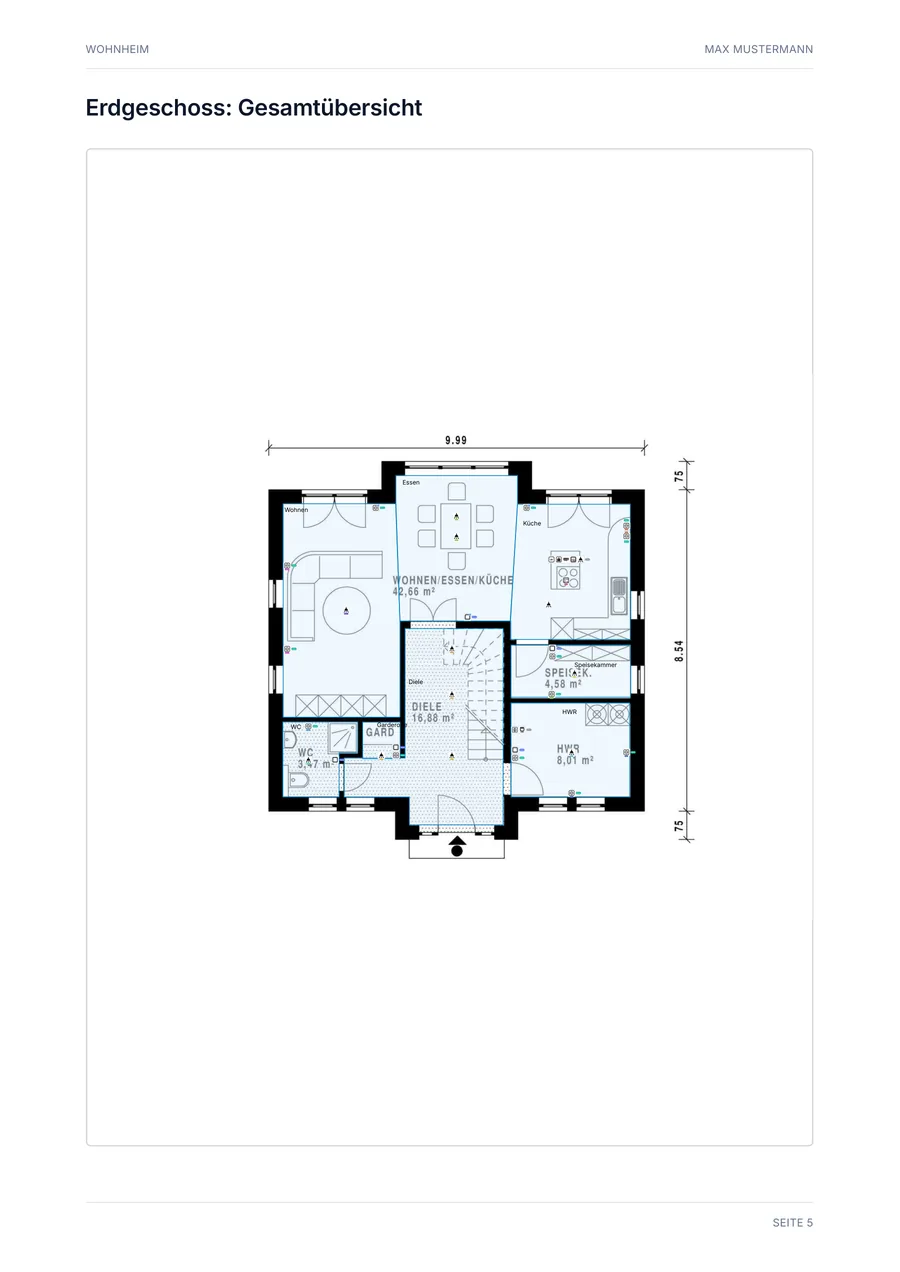
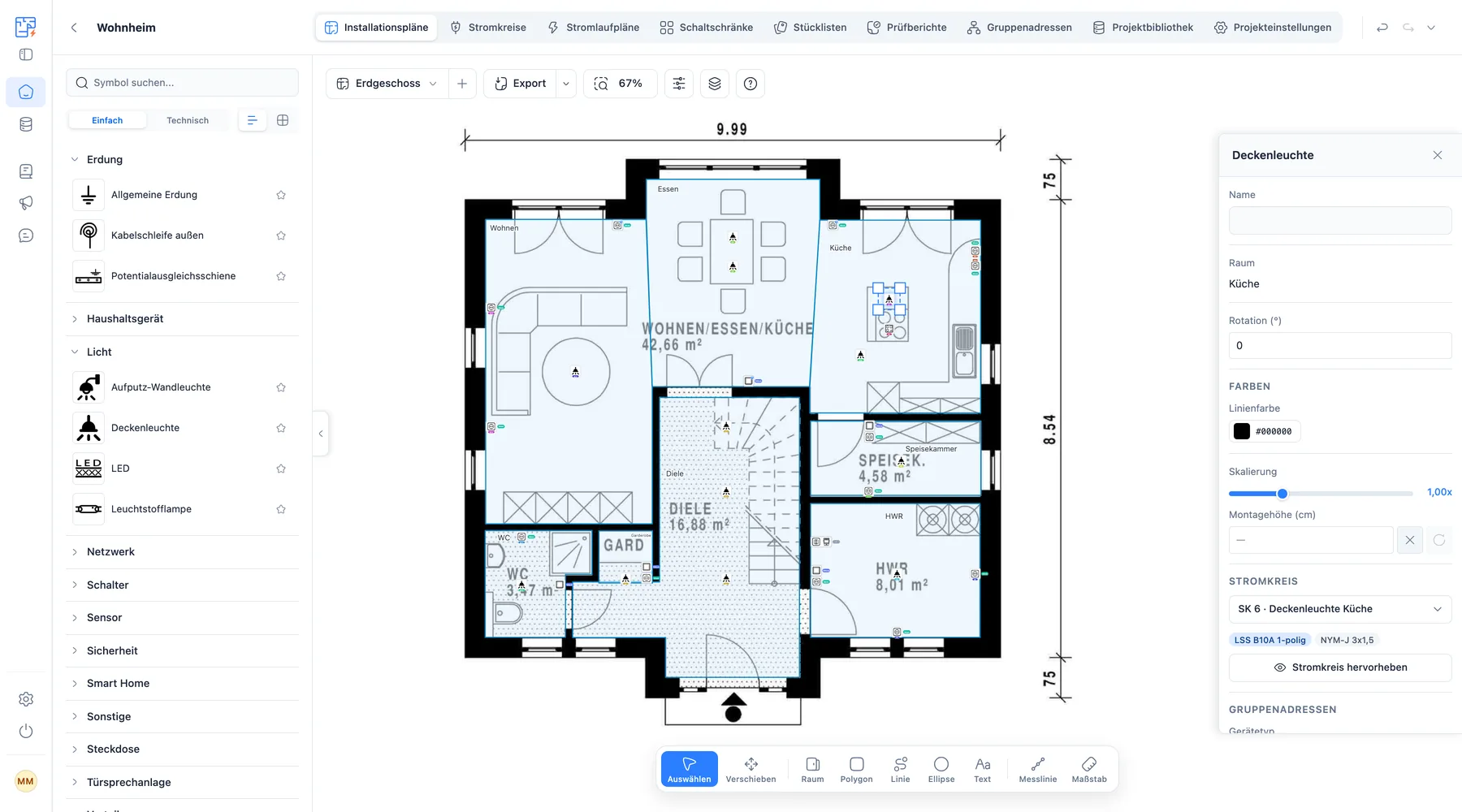
Der SVG-basierte Grundriss-Editor ist das Herzstück. Lade deinen Grundriss hoch, zeichne Räume und platziere Symbole aus der Symbol-Palette per Drag & Drop. Mehrere Einheiten pro Projekt, Symbolgruppen nach Montagehöhe und vollständige Undo/Redo-Historie.
- Grundriss-Upload (PNG/JPG/PDF)
- Symbolgruppen nach Montagehöhe (DIN 18015-2)
- Messlinien, Einrasten an Wänden und Symbolen, Tastenkürzel
- Mehrere Einheiten (Etagen/Wohnungen) pro Projekt
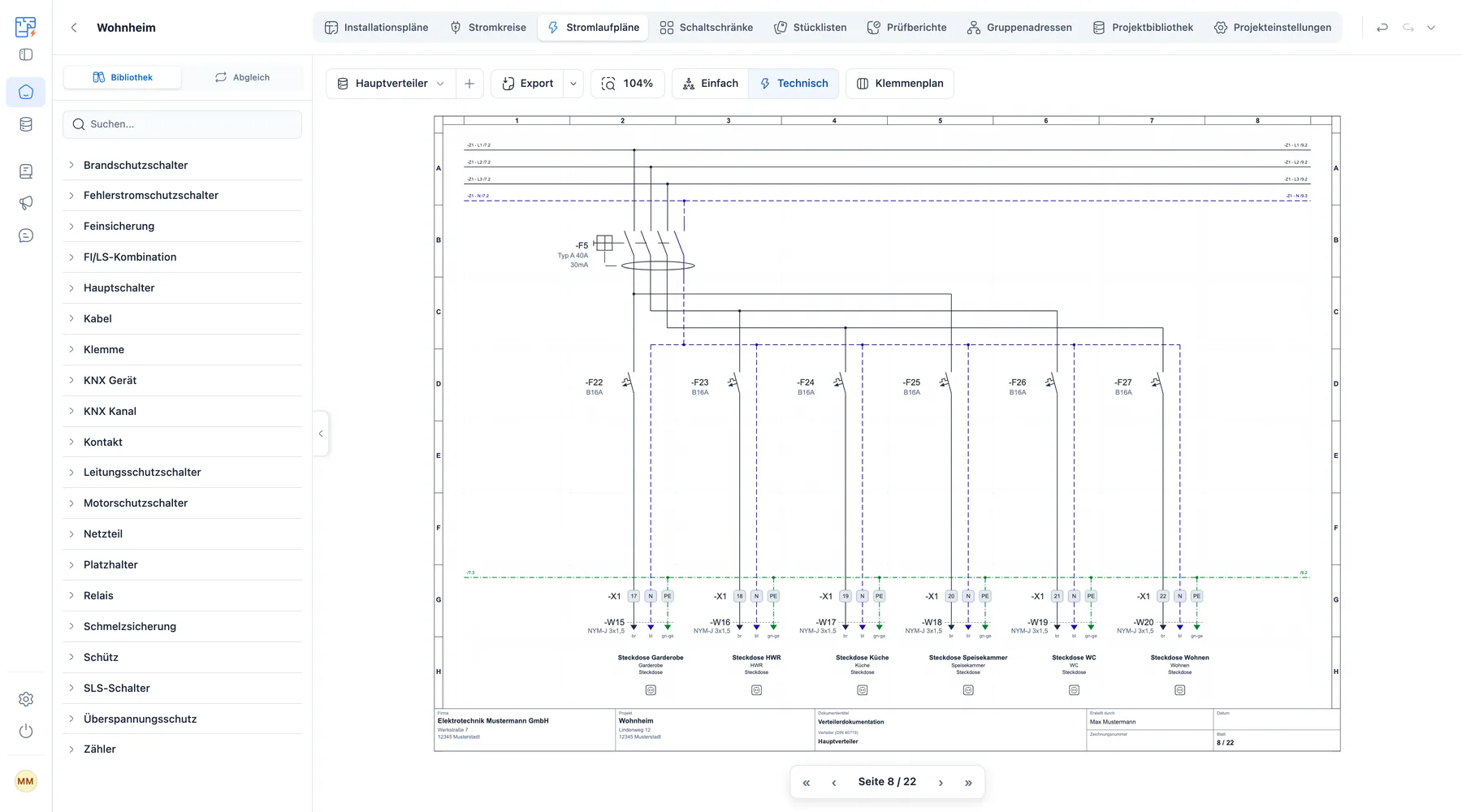
Stromlaufplan
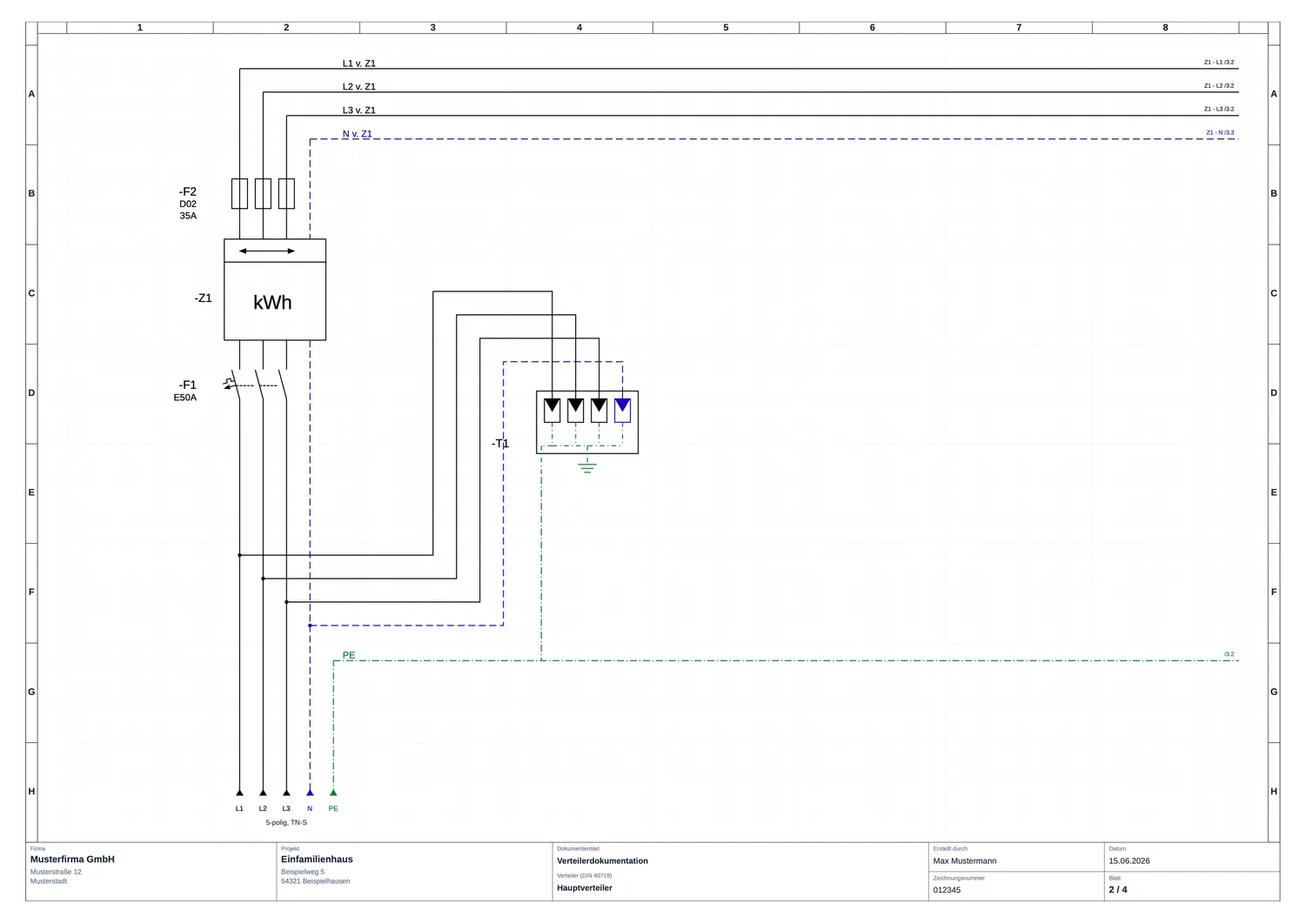
Ein eigenständiger Editor für normgerechte Stromlaufpläne. Du baust die Topologie deiner Anlage als Baum auf, das mehrseitige Layout mit Sammelschienen, Klemmenleisten und Querverweisen generiert myElectricPlan automatisch daraus.
- Sammelschienen-Visualisierung
- Mehrseitiges Layout mit Querverweisen
- Hierarchische Geräte-Baumansicht
- Automatischer Aufbau aus der Topologie, ohne manuelles Zeichnen
Schaltschrankplanung
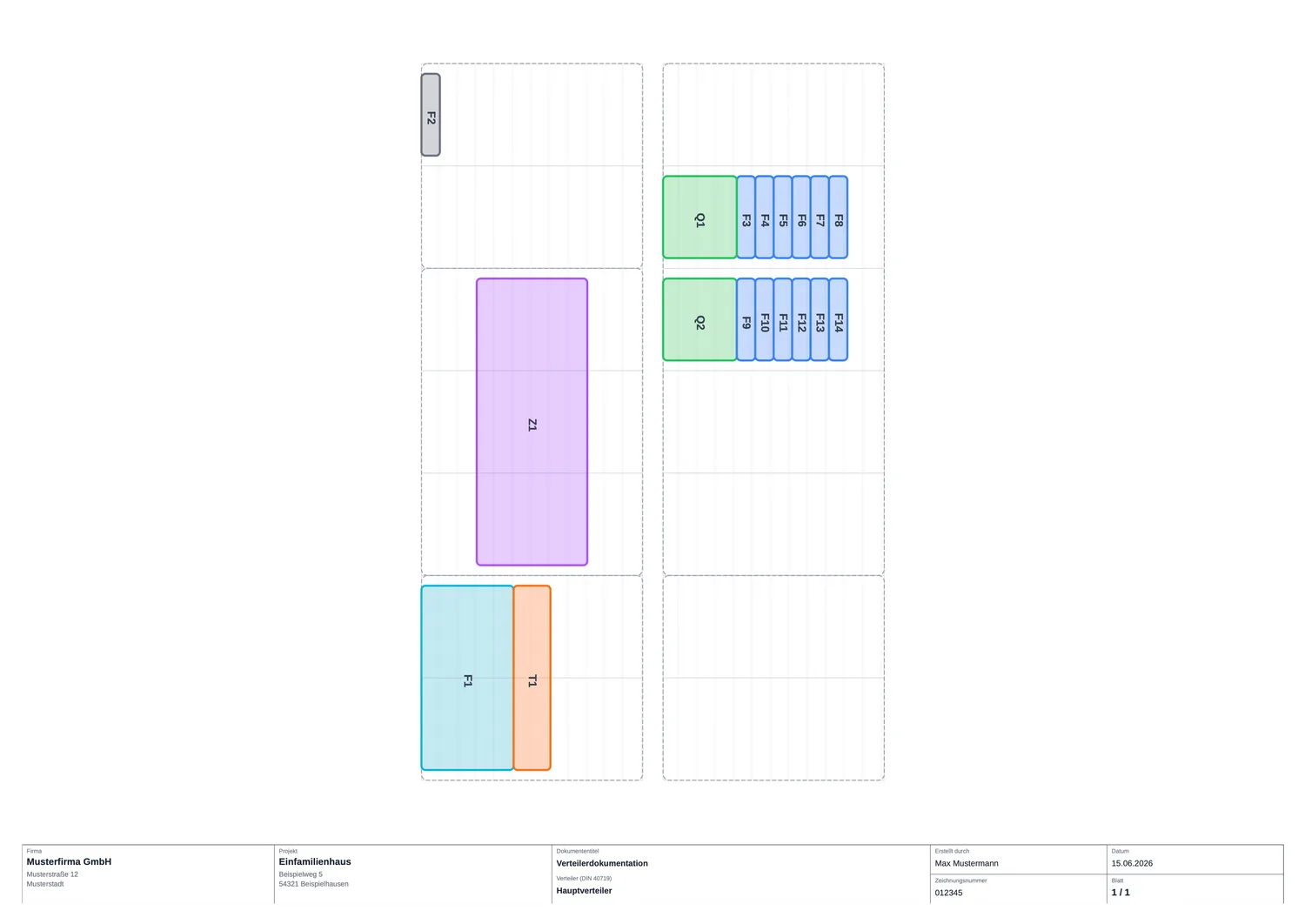
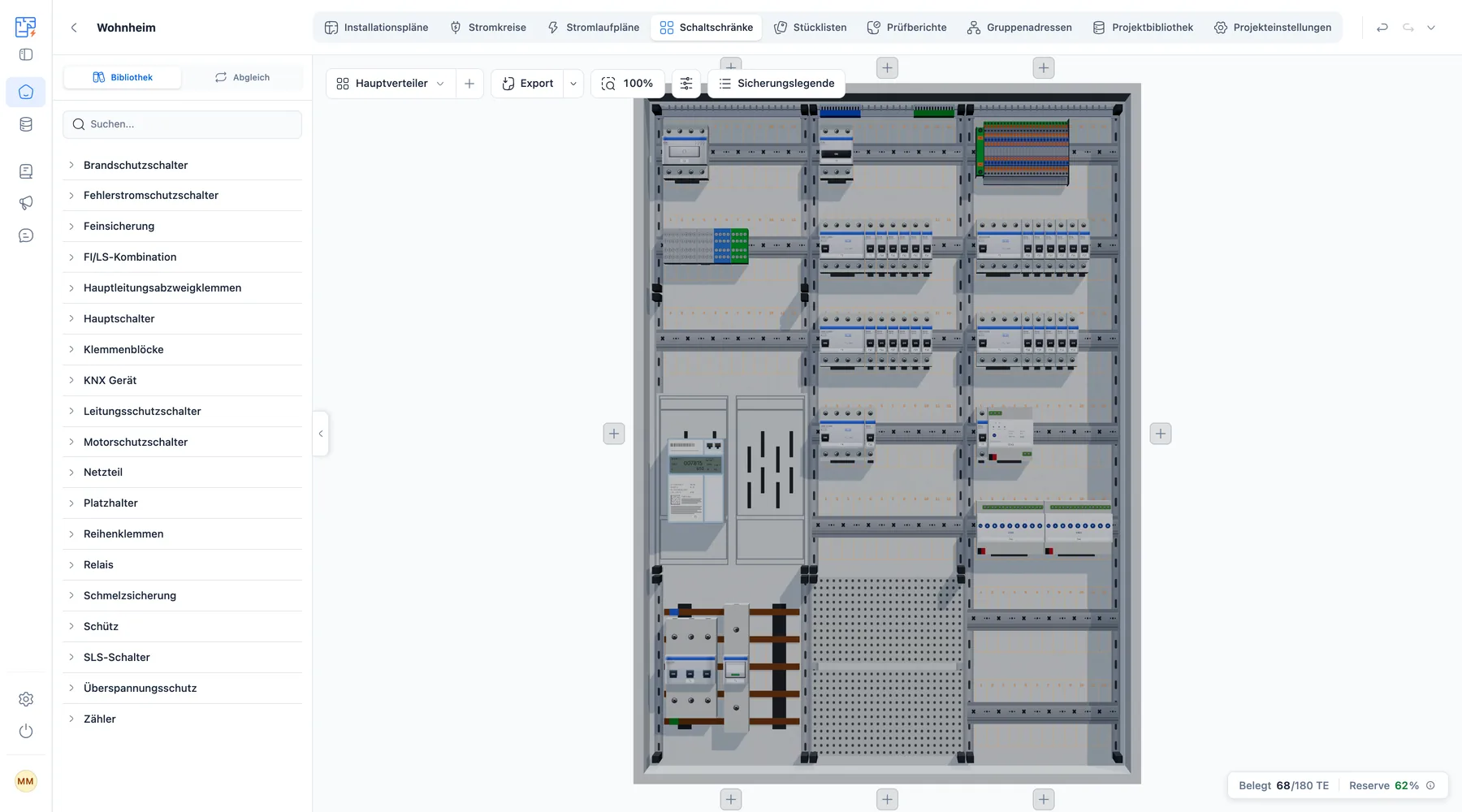
Plane deine Verteilerschränke grid-basiert mit exakter TE-Positionierung. Die Geräte aus deinem Stromlaufplan stehen unter Abgleich bereit und du ziehst sie in die Reihen. Oder du baust den Schrank komplett manuell auf.
- TE-basierte Positionierung
- Mehrere Verteiler pro Projekt
- Aufbauplan und Sicherungslegende als PDF
- Direkte Verknüpfung zum Stromlaufplan
Funktionen
Alles was du brauchst, in einem durchgängigen Workflow
Von der Planung bis zur fertigen Dokumentation. Jedes Modul arbeitet für sich oder nahtlos zusammen.
Installationsplan
Erstelle professionelle Installationspläne direkt auf deinem Grundriss. Symbole per Drag & Drop platzieren, konfigurieren, exportieren.
Mehr erfahrenStückliste
Zählt automatisch die Symbole im Plan, die Geräte und Klemmen im Schaltschrank und die Kabellängen. Export als CSV für Excel oder Kalkulation.
Stromlaufplan
Normgerechte Stromlaufpläne erstellst du in einem eigenständigen Editor, einzeln oder als komplette Dokumentation.
Mehr erfahrenSchaltschrankplanung
Die Geräte aus deinem Stromlaufplan stehen automatisch synchronisiert bereit, den Aufbau passt du jederzeit an.
Mehr erfahrenKNX-Gruppenadressen
Automatische Erzeugung von KNX-Gruppenadressen aus den Räumen deines Plans. Export als XML für den Import in die ETS.
Mehr erfahrenPrüfprotokolle
Prüfberichte und Protokolle aus den Stromkreisdaten vorbefüllen. Dokumentation für Abnahmen und Revisionen.
So geht's
Elektroinstallation planen: So geht's im Browser
Vom Grundriss bis zur fertigen Dokumentation in vier Schritten. Du brauchst keine Installation und keine CAD-Kenntnisse.
- 1
Grundriss hochladen
Lade den Grundriss als PDF, PNG oder JPG hoch und kalibriere den Maßstab über zwei Referenzpunkte.
- 2
Elektroplan zeichnen
Setze Steckdosen, Schalter, Leuchten und Datendosen aus der Symbol-Palette per Drag & Drop. So entsteht dein Elektroinstallationsplan Raum für Raum.
- 3
Stromkreise und Verteiler
Ordne die Symbole Stromkreisen zu und die Stromkreise dem Verteiler. Stromlaufplan und Schaltschrank greifen auf dieselben Daten zu.
- 4
Exportieren
Gib Installationsplan, Stromlaufplan, Aufbauplan und Prüfbericht als PDF aus, die Stückliste als CSV. Fertig für Ausführung, Übergabe und Abnahme.
Für wen ist es?
Ob Profi oder Eigenheimplaner. Für alle, die Elektro planen.
Vom Fachbetrieb bis zum Bauherrn: myElectricPlan passt sich deiner Arbeitsweise an.
Elektrofachbetriebe
Betriebe, die professionelle Dokumentation für ihre Kunden erstellen und intern effizient arbeiten möchten.
Kostenlos starten- Installationsplan, Stromlaufplan und Stückliste in einem Projekt
- Dein Firmenlogo auf allen Exporten
- Fertige Dokumentation für Übergabe und Abnahme
Preise
Preise zu deinen Bedingungen
Wähle einzelne Tools oder spare mit dem Bundle. Entscheide zwischen Abo oder Projektlizenz.
Flexibel monatlich kündbar
Kein Risiko
Kein Risiko. Keine Fragen. 14 Tage Geld-zurück-Garantie.
Du gehst kein Risiko ein: Wenn myElectricPlan dich in den ersten 14 Tagen nicht überzeugt, bekommst du den vollen Betrag zurück. Ohne Begründung, ohne Diskussion.
Alle Preise zzgl. MwSt.
FAQ
Häufig gestellte Fragen
Hast du weitere Fragen? Schreib uns an support@myelectricplan.com
Plane wie 3300+ Nutzer: digital statt doppelt.
Installationsplan, Stromlaufplan und Stückliste in einem Projekt, mit denselben Stromkreisen und Geräten. Starte heute kostenlos.